AI is no longer a side experiment inside SMBs. It is already in sales emails, support replies, meeting notes, contract reviews, budget summaries, and code snippets. In many businesses, adoption started before policy. Employees found a tool, got a faster result, and kept using it. That pattern feels harmless at first. It rarely stays harmless for a long time.
That is the real issue for a growing company. AI can save time, but it can also move business data into places IT never approved, monitored, or secured. A single upload can expose customer records. A copied prompt can reveal pricing strategy. One browser extension can open a new path into company data. These are not edge cases. They are normal business actions done in the wrong environment.
This guide goes deep into AI security for small businesses, shadow AI risks, governance, employee policy, and the role of SASE.
AI Security for Small Business Needs a Stronger Approach
AI security for small businesses now starts with one fact. Employees already use AI at work. This means that the security problem has already moved into live operations for most organizations.
That number changes the job for SMB IT leaders. AI is not a future planning topic anymore. It now sits inside daily workflows that touch customer data, internal documents, source code, pricing files, and regulated records. A larger enterprise can split the work across architecture, security, privacy, procurement, and legal teams. A smaller business usually cannot. One IT leader may own infrastructure, SaaS administration, user support, compliance requests, and incident responses in the same week.
At Consltek , this is the type of business profile we work with most often: organizations with 50 to 250 employees, lean IT teams, siloed operational data, and no single operating model across IT. It also reflects the realities of sectors like healthcare, manufacturing, and education, where downtime, security demands, and compliance requirements are much harder to overlook.
A stronger AI security model does not need enterprise size overhead. It needs focus. The business must know which tools employees use, which data enters those tools, what access rules apply, and how policy gets enforced. Without those basics, AI becomes another blind spot.
What Shadow AI Looks Like in A Growing Business
Shadow AI often begins with ordinary daily work actions
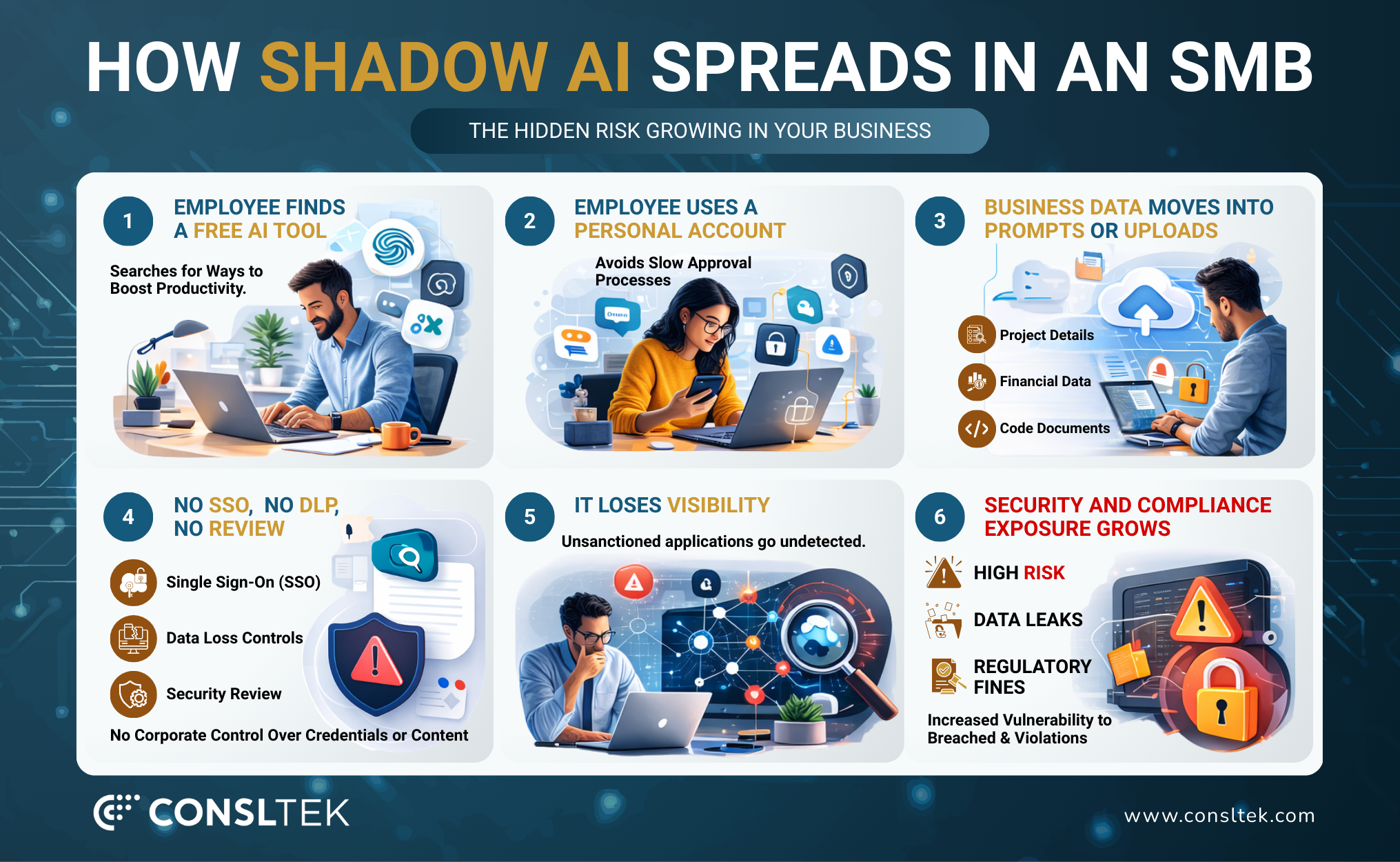
Shadow AI risks usually begin with ordinary work. A sales rep asks a chatbot to rewrite outreach. A finance manager uploads a spreadsheet for trend analysis. A support lead copies a customer issue into a prompt to draft a reply. A developer pastes code into a public model to debug a problem. None of these actions look dramatic. That is why shadow AI spreads so quickly.
Microsoft also found that 78% of AI users bring their own AI tools to work. That behavior, often called Bring Your Own AI, explains why businesses lose visibility so fast. Users do not wait for a formal rollout. They use what helps them now.
Common examples of shadow AI in SMB environments include:
Public chatbots used for proposal drafts, contract summaries, or customer emails
AI browser extensions that read page content or form data
Meeting tools that capture and summarize calls without review
Personal AI accounts used to analyze company spreadsheets or documents
Embedded AI features inside SaaS tools that no one in IT has approved
The risk goes beyond the app itself. Shadow AI often runs through personal accounts, bypasses SSO, ignores retention policy, and avoids formal logging. IT loses the record of who used the tool, what data moved, and which third party received it.
How Shadow AI Creates Security and Compliance Gaps
Shadow AI creates several gaps at once.
It breaks visibility first. If employees use unsanctioned AI tools through personal accounts, IT cannot see which tools are active, which users rely on them, or which data enters those tools. That makes monitoring weak and response slower.
It breaks the policy next. A company may already have clear rules for document sharing, data retention, vendor approval, and customer privacy. Shadow AI routes around those rules. Staff may never upload a regulated file to an unapproved cloud drive, but they may still paste the same data into a chatbot because the workflow feels temporary.
The final gap sits in decision making. AI can return wrong answers with full confidence. If a team uses that output in customer communication, financial analysis, or policy work, the result can trigger bad judgment, rework, or reputational damage.
The Top AI Security Risks Facing SMBs Today
The biggest AI risks rarely come from one dramatic event. They come from small actions repeated across the business. That is why generative AI security needs a broader view. The issue is not only the chatbot. The issue is the full path that connects the user, the prompt, the file, the identity, the app, and the output.
Risk Area
What Usually Happens
What The Business Needs
Prompt Misuse
Staff paste internal data into public tools
Prompt controls and approved tools
File Upload Exposure
Users upload contracts, records, or spreadsheets
DLP and content inspection
App Sprawl
Teams use multiple AI apps outside review
App discovery and access control
Output Risk
Users trust inaccurate or unsafe AI output
Human review and workflow checks
Data Exposure Through Prompts and File Uploads
AI data leakage often starts with a simple prompt or file upload.
AI data leakage often starts with a simple prompt or file upload. Employees usually share more context to get better output. That context may include customer names, contract terms, source code, financial data, support history, or regulated records. Once that data moves into an unapproved AI workflow, the business may lose control over storage, retention, and review.
ChatGPT And Generative AI Tool Risks for Business Users
ChatGPT security risks go beyond prompt privacy. Business users often treat ChatGPT and similar tools like local assistants. They are not. They are third party services that need account controls, vendor review, retention review, and policy rules.
These tools also create output risk. A clean answer can still be wrong. A polished summary can still omit a key clause. A fast draft can still include false claims or unsafe language. That is why public generative AI tools should never sit outside of governance.
Third-Party AI App Sprawl and Access Control Gaps
AI app sprawl grows faster than most teams expect. One group uses ChatGPT. Another uses Copilot. A third uses Gemini. Then browser extensions, note takers, AI schedulers, AI meeting bots, and AI document tools enter the mix. Each new app asks for identity, permissions, or data access.
That sprawl creates a weak point for AI governance of SMB programs. Access rules become inconsistent. Some tools sit behind company accounts. Others sit behind personal accounts. Some have admin controls. Others do not. IT cannot govern what it cannot classify.
Inaccurate Outputs, Unsafe Content, And Decision Risk
AI output can create business risk even when no data breach occurs. The model may misread a policy, produce weak code, summarize a complaint badly, or give a recommendation that lacks context. If the user trusts the output because it sounds polished, the business may act on bad information.
Not every AI error becomes a breach, but the figure shows why organizations cannot treat data mishandling and weak oversight as minor issues.
How Employee AI Usage Can Put Business Data At Risk
Most employee risk does not come from bad intent. It comes from speed, pressure, and convenience. Staff want a quicker draft, a shorter analysis cycle, or a simpler way to summarize information. AI gives them that path. If the company does not give them a safe version of that path, they create their own.
The majority of generative AI users still use personal AI apps. That is one of the clearest indicators of shadow AI risks in the workplace. Personal app use weakens logging, weakens policy control, and weakens the company's ability to manage sensitive data.
This is why an employee AI usage policy must deal with real behavior, not generic warnings. It must address the exact moments where users take shortcuts. That includes copying customer issues into prompts, uploading spreadsheets for analysis, using public tools for contract edits, or connecting AI assistants to company apps without review.
These buyers want reduced risk without more complexity, stronger alignment between IT and business goals, and a partner that brings clarity instead of noise.
AI governance should feel like an operating system for safe AI use
What AI Governance Should Look Like for SMBs
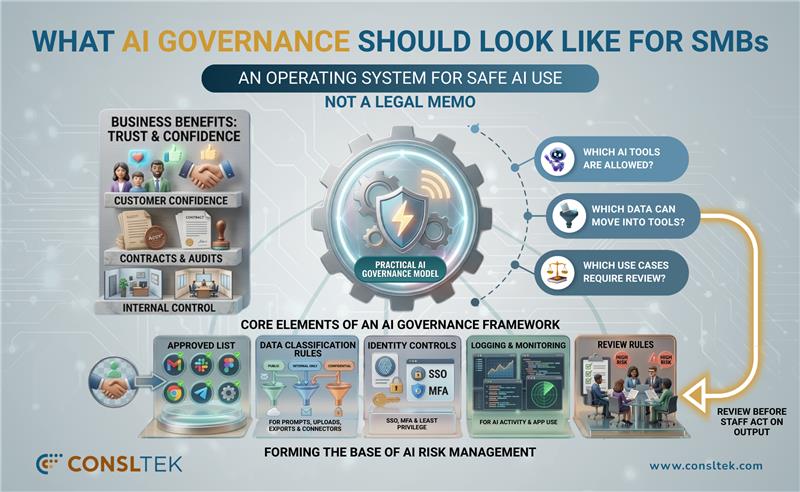
AI governance SMB teams need a model that is simple enough to run and strong enough to hold up under real business pressure. Governance should not feel like a legal memo. It should feel like an operating system for safe AI use.
AI governance is no longer only an internal control issue. It also affects trust, audits, contracts, and customer confidence.
A practical governance model should answer three questions. Which AI tools does the business allow? Which data can move into those tools? Which use cases require review before staff act on the output?
Core Elements of An AI Governance Framework
A strong framework should include:
An approved list of AI tools and account types
Data classification rules for prompts, uploads, exports, and connectors
Identity controls such as SSO, MFA, and least privilege
Logging and monitoring for AI activity and app use
Review rules for high risk use cases such as finance, HR, legal, code, and customer decisions
These controls form the base of AI risk management. They keep AI use inside a defined operating boundary.
Roles And Responsibilities For AI Oversight
IT should own visibility, identity, and technical enforcement. Security or risk leaders should define control standards and escalation paths. Department heads should approve business use cases inside those guardrails. Leadership should support the rules when teams push for speed over control.
This model works well for SMBs because it reflects how smaller organizations actually operate. One team cannot do all of it alone.
How Governance Supports Secure AI Adoption
Good governance does not block AI. It gives staff a safe route to use it. It also gives leadership a clean way to answer customer and auditor questions about AI compliance risks, approved tools, and data handling. For healthcare, education, and manufacturing, that discipline is no longer optional.
How To Create An Employee AI Usage Policy
An employee AI usage policy should read like a working rulebook. Employees need direct answers, not abstract guidance. They need to know what they can use, what they cannot use, what data stays out of prompts, and when human review is mandatory.
That policy should also support secure AI adoption. If it blocks every tool, staff will work around it. If it says too little, it will not change behavior. A strong policy enables low risk use and restricts high risk use.
What To Include In An Employee AI Usage Policy
The policy should cover:
Approved AI tools and approved account types
Prohibited public or unreviewed tools
Restricted data categories
Rules for uploads, connectors, browser extensions, and API keys
Human review requirements for high impact output
Escalation steps for new tool requests
Monitoring and enforcement terms
Employees should never enter regulated personal data, patient or student information, payroll records, credentials, secrets, restricted source code, contract drafts, security details, or confidential pricing data into public or unapproved AI tools.
That line is one of the clearest defenses against ChatGPT security risks and broader data protection for AI tools.
Rules For Approved Tools, Access, And Human Review
Approved tools should sit behind company identity, not personal logins. Access should follow job roles and business needs. Customer facing content, legal text, financial analysis, code, and policy changes should all require human review before use.
Human review should scale with risk. A content brainstorm does not carry the same exposure as a contract summary or code generation request.
How To Roll Out AI Policy Across The Business
Policy rollout should start with managers and workflow owners. They need examples that match how their teams already work. Training should then show employees how to use AI safely inside the approved model. Technical controls should back the written rules. That is how policy moves from paper to practice.
Why SASE Plays A Central Role In AI Security
SASE gives SMB IT leaders one thing they need badly for AI security for small businesses. It gives them one control plane across users, devices, locations, apps, and traffic. AI traffic does not stay in one place. It moves across web sessions, SaaS tools, API calls, remote users, and branch sites. Point products struggle to keep up.
Detecting Shadow AI Across The Business
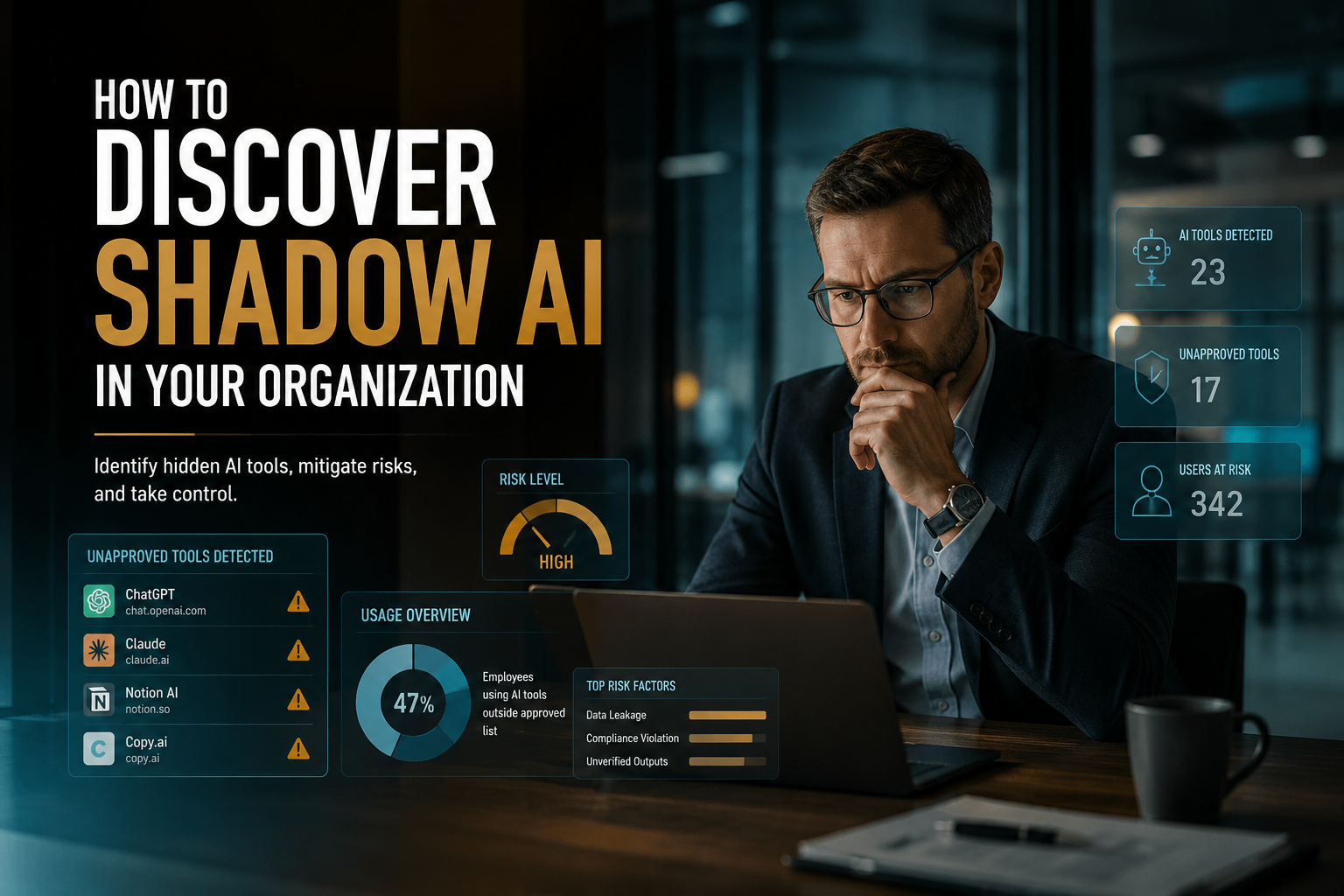
Cato Networks' CASB gives IT managers visibility into sanctioned and unsanctioned cloud applications, including Shadow IT and Shadow AI. Cato's generative AI controls can identify and classify more than 950 generative AI applications — a practical starting point for shadow AI detection.
Cato's DLP service can scan and enforce policies for generative AI traffic such as ChatGPT, including upload and download controls. That kind of inline control matters because policy alone cannot stop a risky upload. Enforcement has to sit in the traffic path.
Strengthening Visibility, Governance, And Access
SASE supports AI access control by linking identity, app visibility, web policy, and data inspection in one model. Governance can define the rule. SASE can apply it across users and locations. That gives IT a way to move from advisory language to direct control.
Protecting AI Usage In Remote And Hybrid Environments
Remote and hybrid work increase AI risk because users act outside the office perimeter. SASE keeps policy close to the user, not the building. That makes SASE for AI security a better fit for modern SMB environments than perimeter only controls.
Vendor technology provides the platform layer. Cato positions its architecture as a unified SASE model with CASB, DLP, secure web gateway, and zero trust network access capabilities delivered in one cloud service. That foundation matters because AI risk touches web access, cloud apps, identity, and data control at the same time.
The platform still needs to fit the business. The right design should map AI tools, data types, user roles, locations, and workflow risk to actual controls. That is especially important for the Consltek ICP, where lean teams need fewer tools, clearer decisions, and predictable operations.
How Consltek Aligns SASE With Customer Requirements
At Consltek , we do not approach SASE as a standard rollout. We begin with the customer's environment, access needs, security gaps, and business priorities. Then we align the right vendor technology to those requirements so the solution fits the way the business actually runs.
A clear example of this can be seen in our work with Cleveland University. The environment involved fragmented security tools and growing cost pressure. We helped move that setup toward a more streamlined and cost-effective model through a Cato and Consltek implementation. The engagement also helped uncover $200K in redundant security tools and gave the customer clearer visibility into its security posture.
That reflects how we work in practice. We assess the current state first, identify where gaps and tool sprawl are creating risk, and then map SASE capabilities to the customer's actual requirements. We focus not only on the technology, but also on how the solution will support end users, simplify oversight for IT teams, and reduce complexity across the environment.
For businesses looking to reduce shadow AI risks, improve AI security for small business, and secure access across distributed teams, we use that same approach to turn vendor technology into a solution that works in day-to-day operations.
The Next Step In AI Security For SMB IT Leaders
AI use will keep growing across SMBs. The real question is whether that growth happens inside control or outside it. AI security for small businesses now depends on visibility, policy, access control, and data protection that match how people actually work. That is the only practical way to reduce shadow AI risks without killing productivity.
Start with discovery. Define approved tools and restricted data. Build governance that staff can follow. Enforce policy through SASE, not only through written guidance. Then refine the model as AI use grows.
Consltek can help shape that path by aligning vendor technology to business needs, closing visibility gaps, and turning SASE into an end user solution that supports secure AI use across the business. If the business needs a clearer way to govern AI, control data exposure, and secure remote access, this is the right point to start that conversation.
Securing AI is essential because AI systems process sensitive data, automate decisions, and interact with core business operations. Without proper safeguards, they expose organizations to data leaks, adversarial attacks, compliance risks, and operational disruptions.
Key risks include data privacy breaches, unauthorized access, manipulation of training data, model tampering, API exploitation, and output‑level vulnerabilities such as malicious prompt injections.
Organizations should enforce AI usage policies, restrict sensitive data input, implement role-based access control (RBAC), configure data loss prevention (DLP) rules, and educate employees on safe AI usage to avoid accidental exposure.
You should adopt a lifecycle-based AI security framework that includes securing models, governing data sources, validating outputs, monitoring agent behavior, and maintaining strong cloud/API access controls. Regular audits and policy enforcement are essential.
AI systems should operate in a Zero Trust environment where every request—whether from users, APIs, or agents—is continuously authenticated, verified, and monitored. This reduces the risk of unauthorized access and limits the blast radius of attacks.
CIOs, CISOs, and AI leads must collaborate to build shared processes, cross-functional teams, and joint oversight mechanisms. Coordinated governance ensures AI adoption aligns with mission objectives while reducing enterprise‑level risks.
Follow security guidelines such as validating data quality, securing data pipelines, protecting training inputs, and performing integrity checks throughout the AI lifecycle to maintain accurate and trustworthy model performance.
Yes. Employees must be trained to recognize AI‑related threats (e.g., deepfake scams, social engineering, malicious outputs), understand safe data handling practices, and follow organizational AI policies to reduce human‑driven security vulnerabilities.